I spend a lot of time trying to improve the Denim Fit Finder app. Whether I’m learning design principles and looking at other well-made sites for inspo, finding more niche denim brands to add, or expanding the women’s side of the collection, I’m eager to work on it every day. Part of that is because it’s easier and requires less vulnerability than writing essays, taking fit pics, or recording reels in my driveway. But the biggest reason is that I really believe it can be a valuable tool to a niche community and hasn’t yet realized its potential or found its audience.
For most of its life, Fit Finder has been a static reference tool. You could log a pair that fits, run a search to find something similar, maybe find a new pair worth trying, and then leave. If I added a brand the next week and they happened to make the exact jean you were looking for, you’d only find out if you happened to visit again and repeat the search.
That’s the issue I spent most of October trying to solve. The catalog has continued to grow, from 155 brands and 3,385 jeans at the end of September to 167 brands and 3,831 jeans now. This added more than 600 new jeans, with some duplicate entries merged and names corrected along the way. But that growth is only useful if it reaches the person those new pairs fit. So this month, I focused on helping the Fit Finder reach you and making its answers easier to trust.
Match Alerts, Now Free and Weekly
Fit-match alerts used to be a Premium-only feature. Every day, the Fit Finder checks newly added jeans against the pairs saved in each subscriber’s Closet and sends an alert when one measures close enough to your saved pair.
Free accounts get the alerts now too, once a week. Sign in, save a pair you own to your Closet, and each week you’ll hear about a newly added model that matches it. The free alert names one match and tells you how many more there are. Premium still gets every match, daily, alongside price-drop and restock alerts.
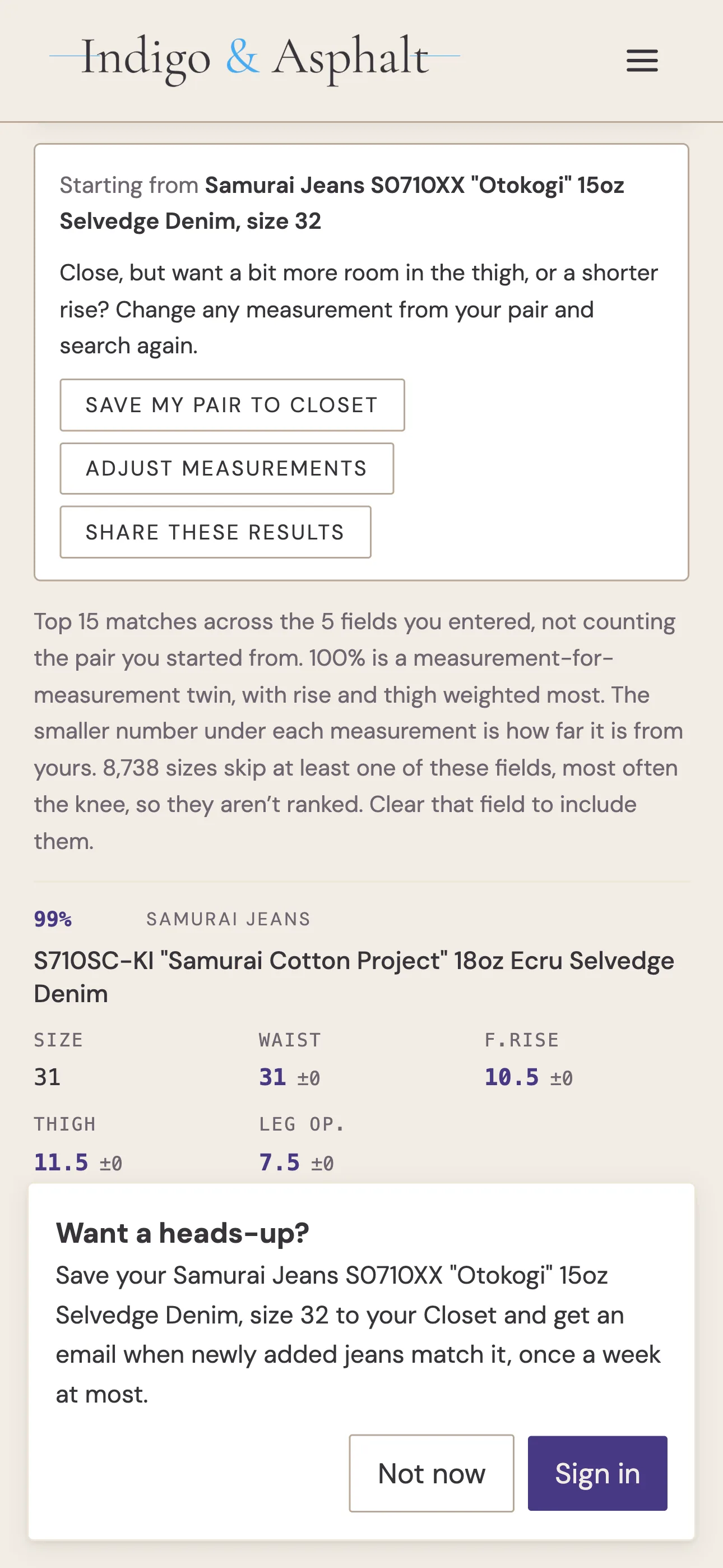
Save a pair to your Closet, or start a Find Similar search from a pair in the database, and the Fit Finder asks once whether you want a heads-up. If you don’t want the alerts, just click “Not now,” and it leaves you alone for two weeks.
Alerts and News by Email
Until this month, alerts only reached you as push notifications in the Android app. If you used Fit Finder on the website or on an iPhone, you couldn’t get alerts.
You can now receive alerts by email. Your account page has two email switches beside the push alerts: one for match alerts (weekly on free, daily on Premium) and one for news and updates like this one. These are turned off by default. I don’t want to spam you or break the trust you put in me when you signed up, so you only get alerts if you want them.
If you’re on Premium, everything from one day arrives as a single email: fit matches, price drops, restocks, and brand news together, each pair linking straight to its own page. Every email has a one-click unsubscribe at the bottom, and replies come to me directly, not a no-reply void.
↑ Table of ContentsWomen’s Jeans Additions
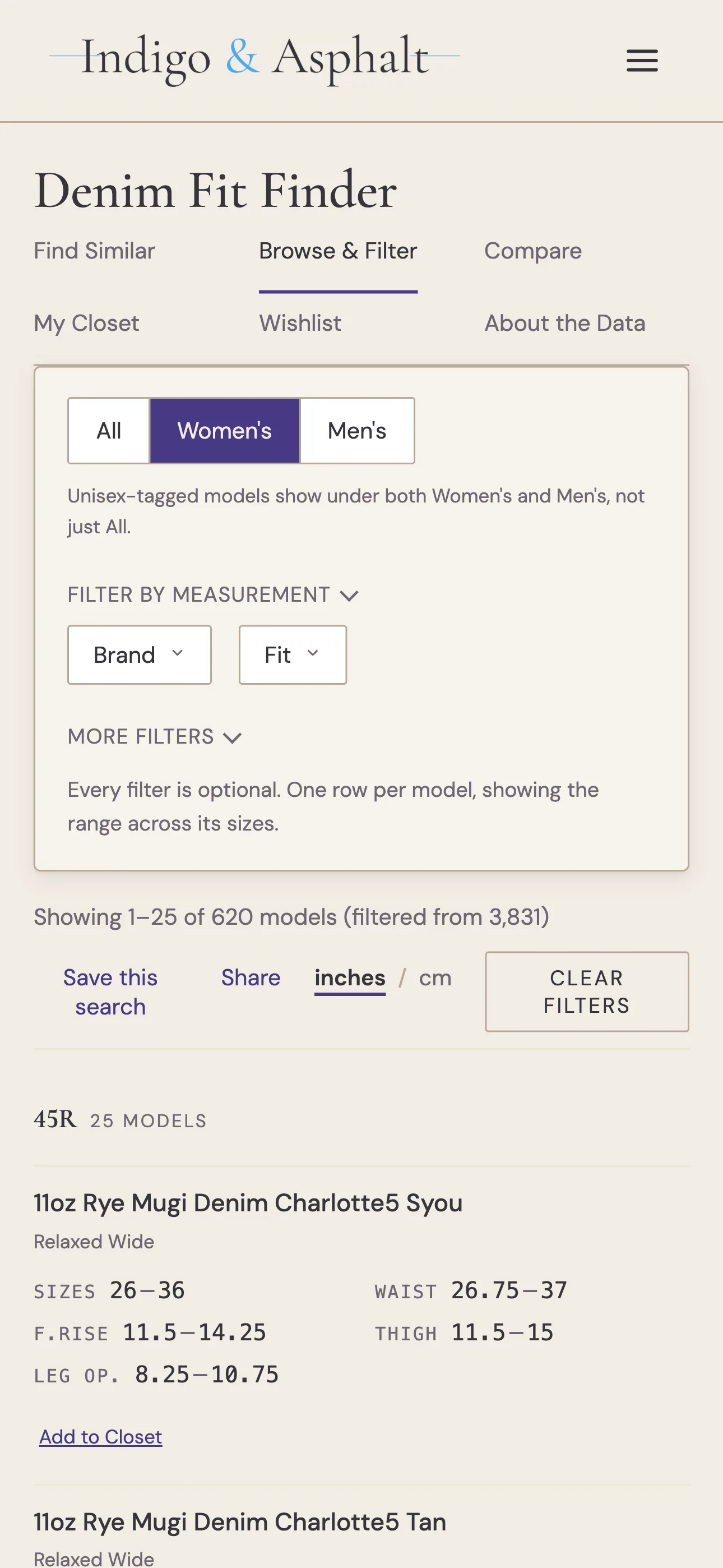
Browse has an All / Women’s / Men’s switch at the top, and this month the Women’s side got deeper. I added about 150 women’s models from 22 brands, bringing the Fit Finder from 282 to 429 women’s models. The biggest additions:
- Japan Blue, 31 women’s models
- Red Card Tokyo, 27 models, plus Big John, Urvin, Setto and Deep Blue, mostly from Denimio’s women’s section.
- Warp + Weft, 16 models
- 45R, 11 models
- Studio Nicholson, 9 models, and Blackhorse Lane Ateliers, 6, both new to the Fit Finder this month
Thirteen brands have women’s jeans in the Fit Finder for the first time, including Hiut, Raleigh Denim Workshop and Boden.
The Women’s filter now includes 620 models: the 429 women’s models, plus 191 unisex models that show under both Women’s and Men’s.
A brand’s men’s and women’s cuts can share a name and not a fit. Japan Blue’s women’s “Loose” is a genuinely wide-leg, while its men’s J508 Loose is actually a relaxed straight fit. The Fit Finder now files each by its own cut, so filtering for wide legs finds the right one.
Find Similar Explains Its Match %
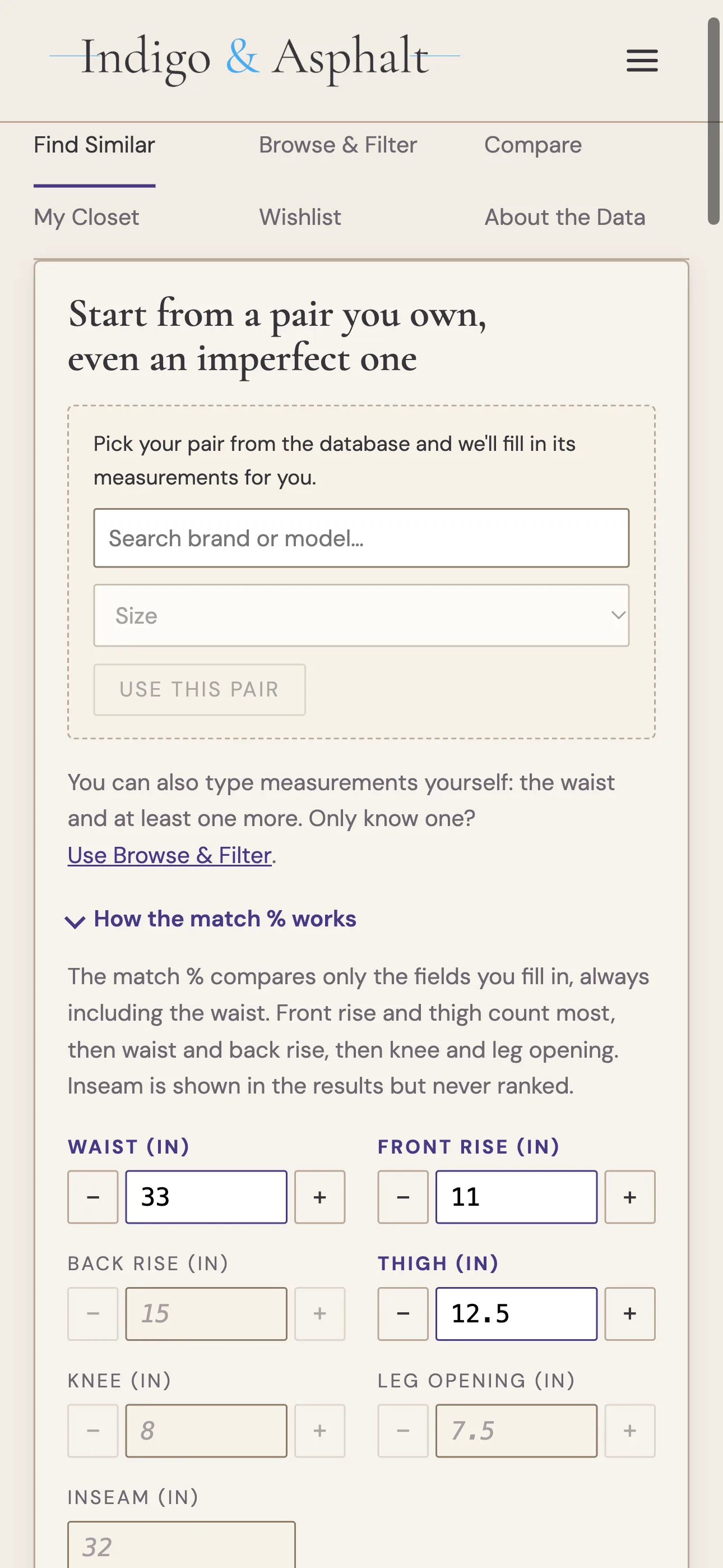
Find Similar ranks every jean in the database by how closely it matches a pair you saved to your closet, and assigns each one a percentage. Until now, that percentage was calculated behind the scenes.
There’s now a “How the match % works” note right above the fields. The short version: front rise and thigh carry the most weight in the calculation because they have the biggest impact on how a pair fits. Waist and back rise come next, then knee and leg opening. Inseam shows in the results but never counts toward the match, since most jeans come in one long inseam meant to be hemmed after you buy.
Matching also needs the waist plus at least one more measurement now. A waist alone isn’t enough to call anything a 94% match, so if it’s the only number you have, the Fit Finder points you to Browse & Filter instead.
Fine-Tune a Match
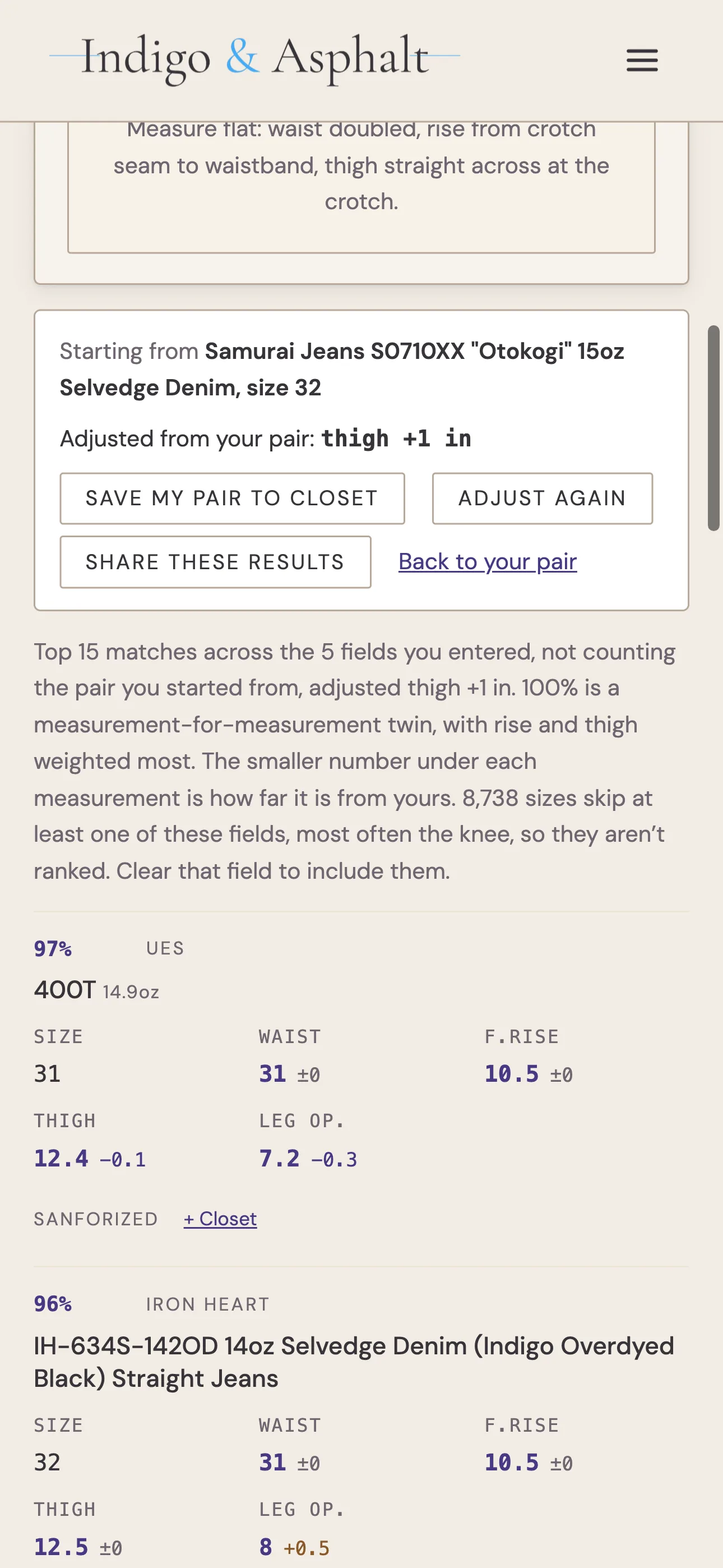
Find Similar works best when you start from a pair you own, and most of the time that pair is close but not perfect — a little tight in the thigh, or a rise you’d like an inch shorter. After you search, the Fit Finder now shows the pair you started with and an “Adjust measurements” button. Nudge any measurement with the + and − buttons beside it, search again, and the search results will call out what changed: “Adjusted from your pair: thigh +1 in.” “Back to your pair” reverts to the original measurements.
On a phone, the results now scroll into view as soon as a search finishes, so tapping the button no longer looks like nothing happened. The + and − buttons sit on the same row as each measurement, which shortens the form, and they stay greyed out until a field has a number.
It Catches a Typo Before You Search
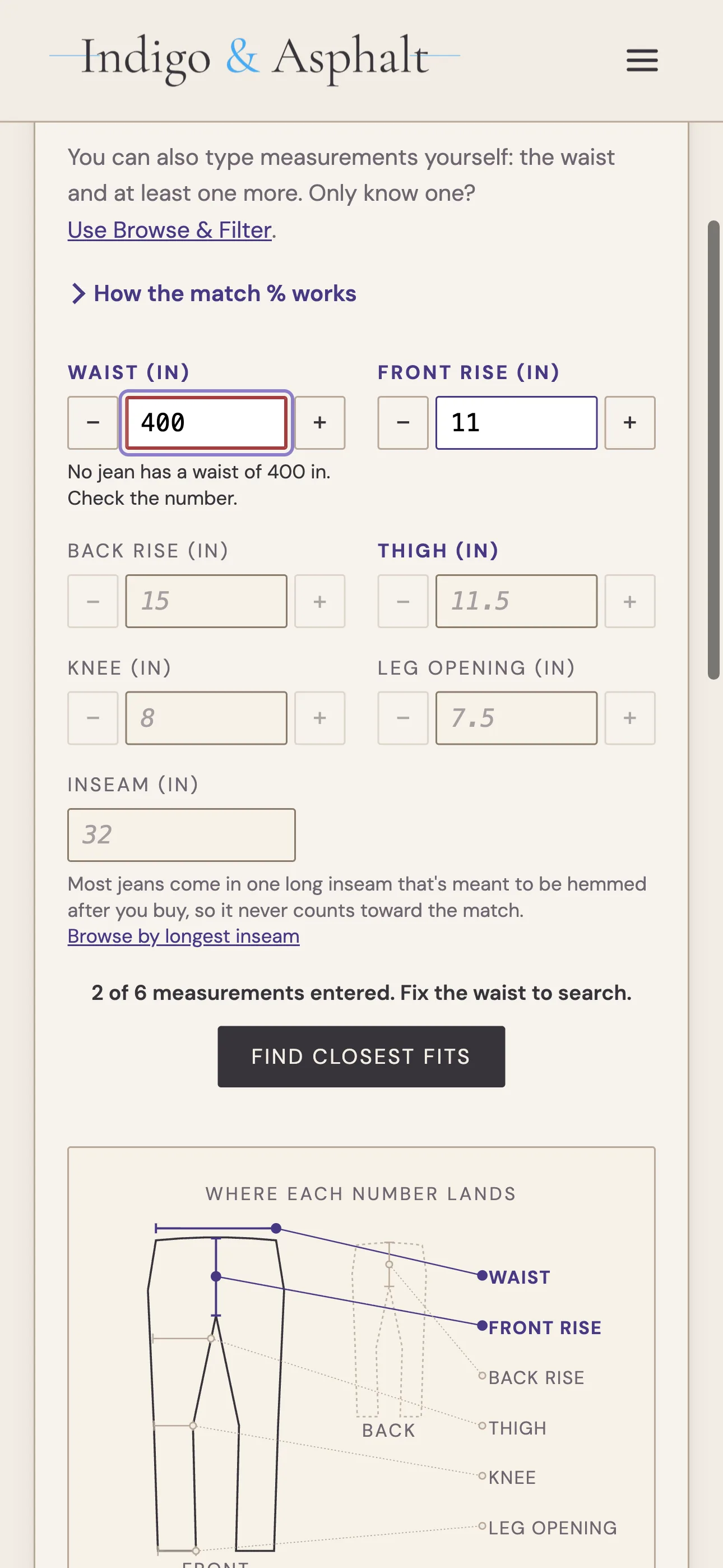
Type a waist of 400 by accident, and the old Fit Finder would cheerfully return fifteen jeans, each a 0% match. Now it stops, outlines the field in red, and says “No jean has a waist of 400 in. Check the number.” Unusually large but real measurements still search normally, so big waists aren’t flagged by mistake.
Browse Shows Which Size Matched
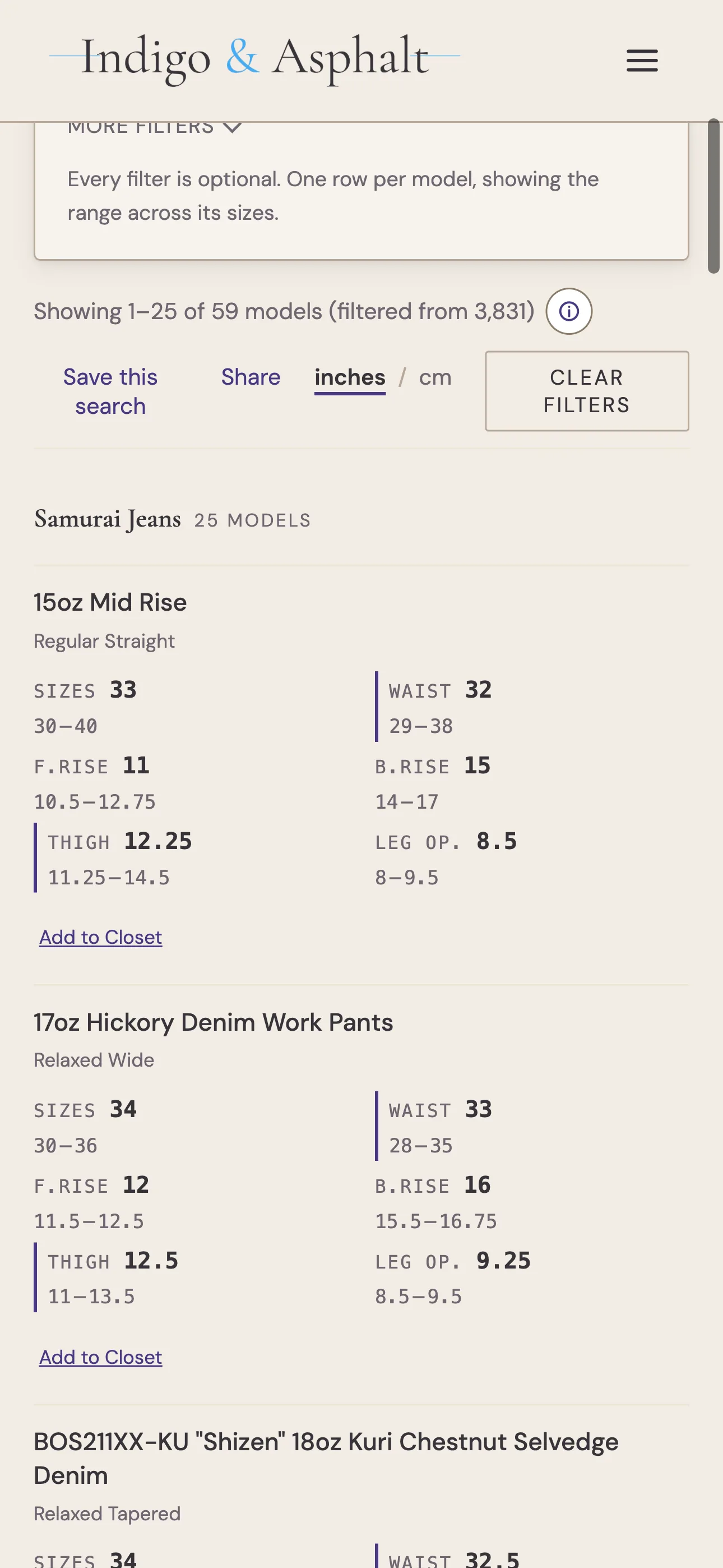
When you filter Browse by measurement, say a 32 to 33 inch waist with a 12 to 12.5 inch thigh, a jean shows up if one of its sizes meets every range at once. The trouble was, the table showed each model’s full range across all sizes, so you couldn’t see which specific size was a match
Now it clearly shows which size you want. Each filtered column leads with the matching size’s measurement in bold, the model’s full range sits underneath in lighter text, and a bar marks the columns you filtered on. If several sizes match, you see the smallest.
Browse’s Dropdowns Only Show What’s Left
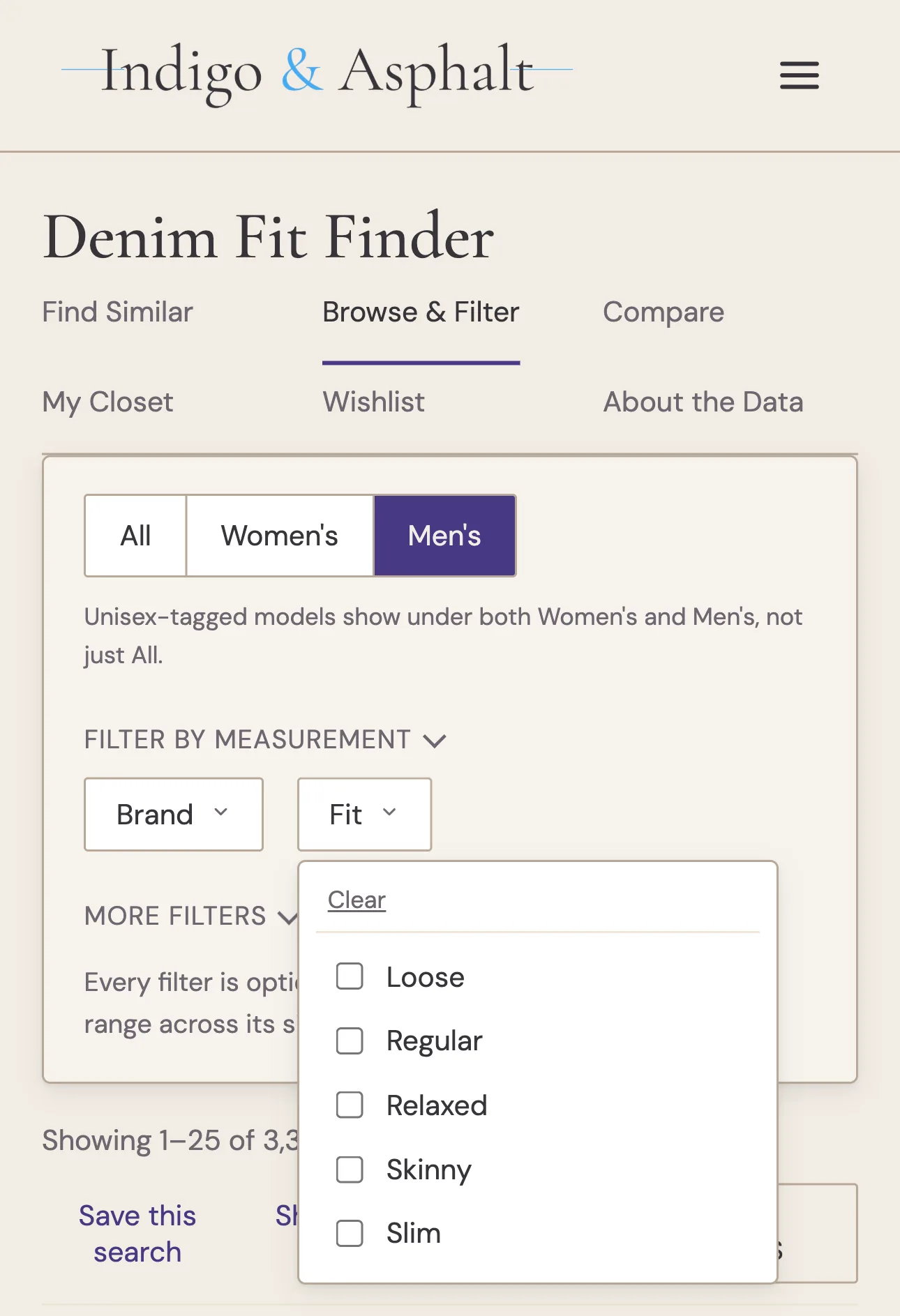
With 167 brands, it was easy to stack filters until a dropdown filled with choices returned nothing. Now each Browse dropdown (Brand, Fit, Leg shape, Fabric, and Weight) lists only the values still possible under every other filter you’ve set, plus measurements and the Women’s/Men’s switch.
Toggle to Men’s models and the Boyfriend and Curvy options drop out of the Fit filter. Search for a relaxed or loose fit with a front rise of 12.5 inches or more, and the Brand list shrinks from 167 to 94 matching brands. Anything you’ve already ticked stays put, so you can still add a second brand or fit.
Share a Search
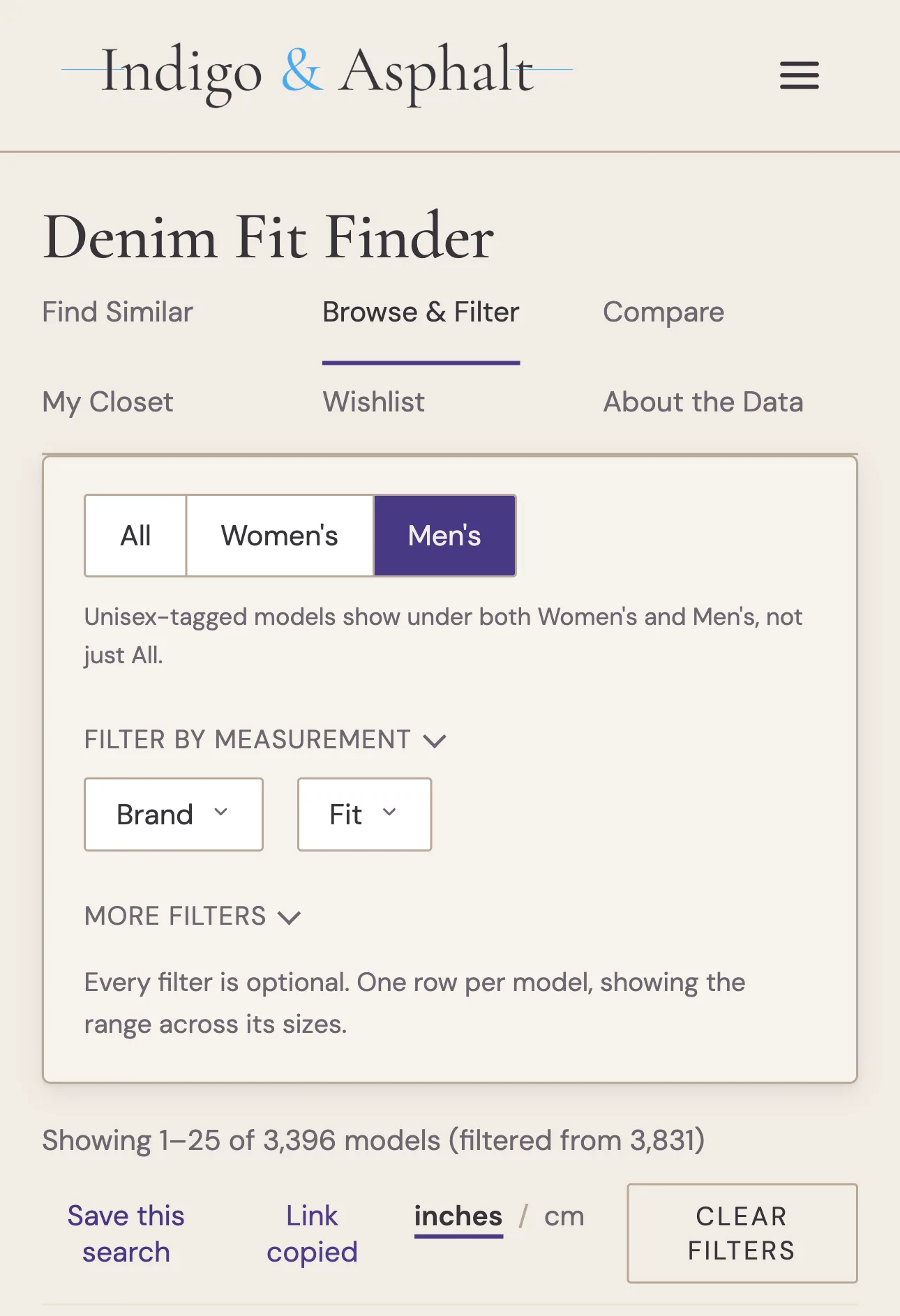
Browse now has a Share link beside “Save this search”, and Find Similar results have “Share these results”. Either one shares the exact search you’re looking at, including filters and measurements. On a phone, it opens your share sheet. On a computer, it copies the link. This was built specifically for Fit Finder App users, since you don’t have a URL bar to copy.
When a friend asks what jeans you’d recommend for their build, you can send them the search instead of a list of names.
Model Pages Summarize What Their Chart Means
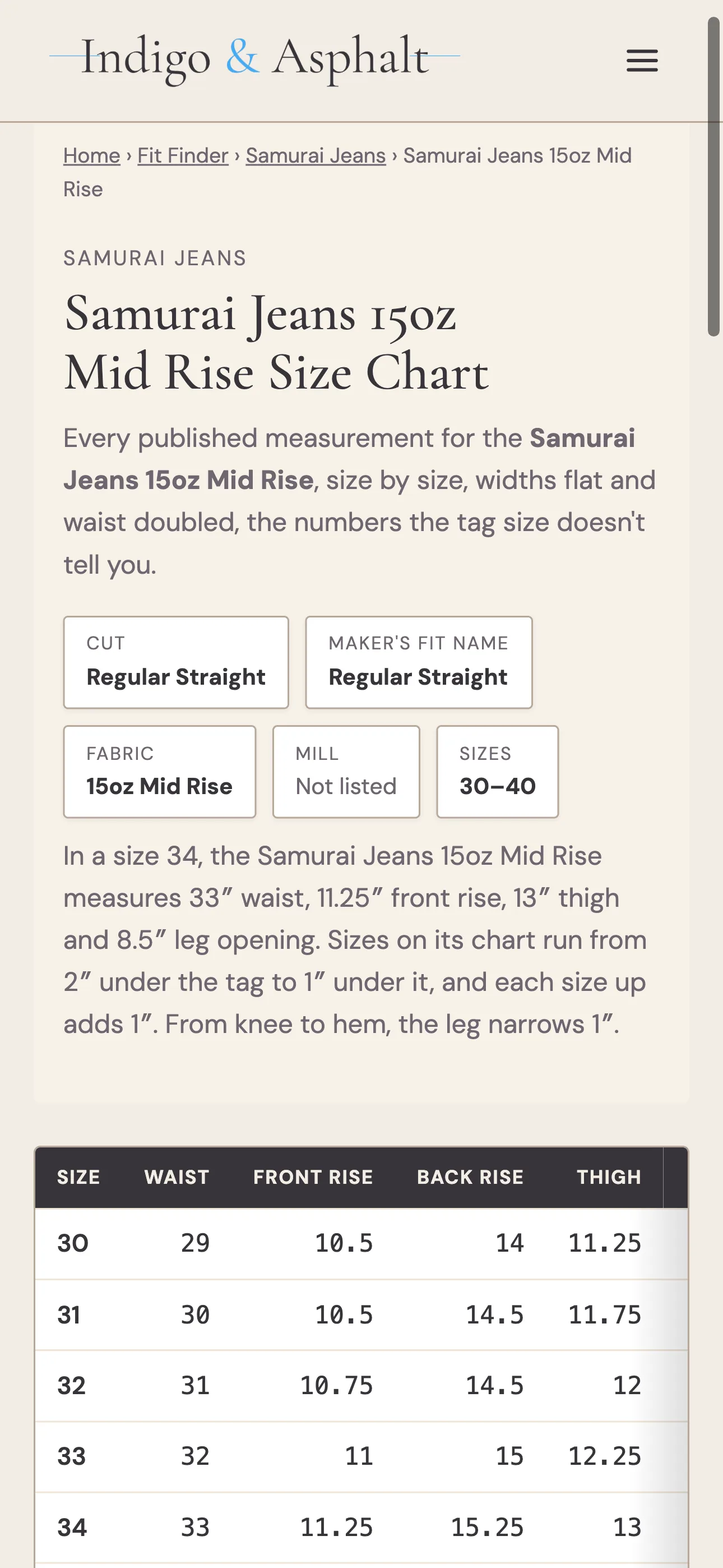
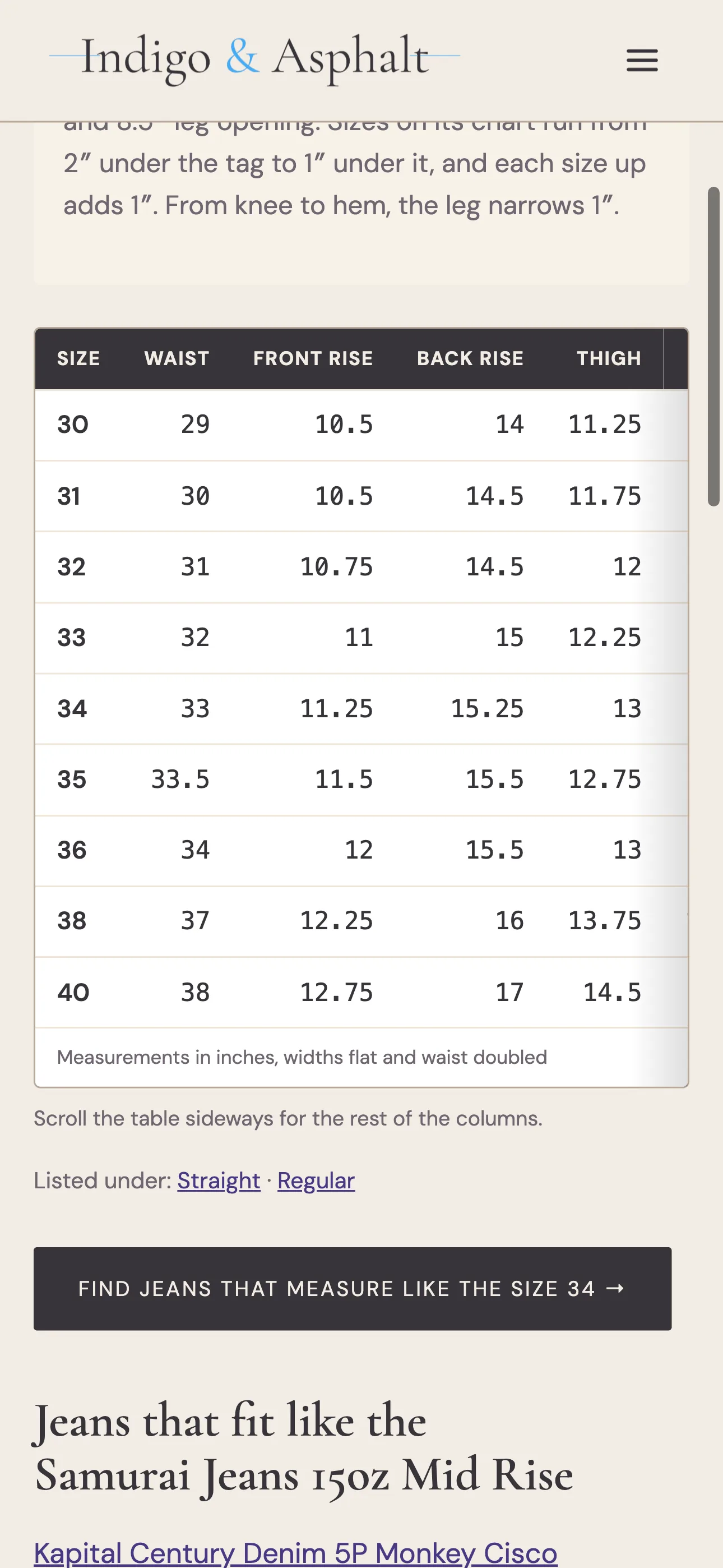
Every jean in the catalog has its own page with its full size chart. Those pages now spell out what that chart says, so you don’t have to work it out from a table of numbers:
- how far each size runs from the number on its tag,
- how much each size up adds
- how much the leg narrows from knee to hem.
For the Samurai Jeans 15oz Mid Rise, that reads: sizes run from 2″ under the tag to 1″ under it, each size up adds 1″, and the leg narrows 1″ from knee to hem.
The big button on every model page used to open an empty Find Similar. Now it reads “Find jeans that measure like the size 34,” opens the tool pre-filled with that size’s measurements, and excludes the jean you started from.
A Fix for Android
If you use the Android app, tapping a Fit Finder notification sometimes opened your browser instead of the app. Version 1.2.4 fixes that. Taps now open the right screen in the app every time.
↑ Table of ContentsPrices in the Store’s Own Currency
Every store link now shows its price in the currency that store actually charges. Four shops had been showing euros, pounds or Danish kroner as if they were dollars, so a pair of Another Aspect jeans that costs about $225 read as $1,500. Redcast Heritage, Eat Dust, Clutch Cafe and Another Aspect now show their real prices: €310, £185, DKK 1,500.
45R, which charges in Hong Kong dollars, had no prices at all. About 500 of its links show them now. Price-drop alerts compare only two prices in the same currency, so an exchange-rate swing could have made a daily refresh look like a price drop
↑ Table of ContentsNew in the Catalog
About 15 new denim brands joined this month, including Blackhorse Lane Ateliers, Studio Nicholson, Raleigh Denim Workshop, Free Agency, Kibata, Lawford, Urvin, Bleeding Indigo and The Hidden Rivet. That brings Fit Finder to 160+ brands and 3,800+ jeans, with more than 600 new this month and more than 32,000 individual sizes measured.
↑ Table of ContentsWork in Progress: Denim Mills
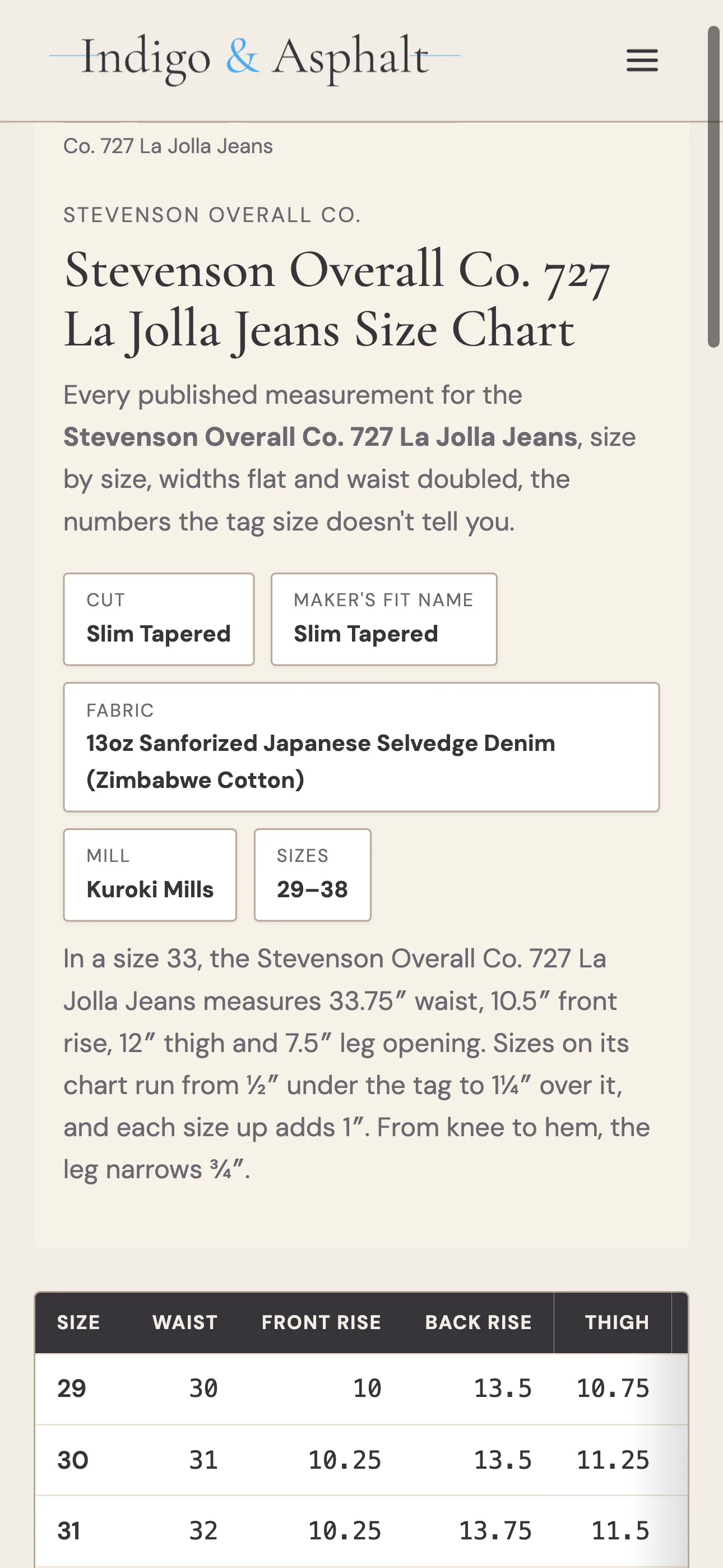
Every model page has a Mill field, and for most jeans it still says “Not listed.” A mill goes in only when the brand or store calls it out. This month I went back through product pages and filled in 77 that did, from brands like 3sixteen, Stevenson Overall Co., Red Card Tokyo, Asket, Levi’s Vintage Clothing and Indigofera. Kowa Mills (Hiut’s Super Zero) and Proximity Manufacturing (Seven Titans) are new to the list.
That takes it from 421 jeans with a named mill to 474, out of 3,831. Kuroki is up from 60 entries to 92, Kaihara from 13 to 28, and Candiani from 2 to 11. It’s a long way from complete, so if you know of a resource that can help me complete this task, drop me a comment.
What’s Next
If all goes to plan, the Fit Finder will come to iPhone next month with the iOS app. I submitted the app for review on October 11th, and it hasn’t started yet, so fingers crossed I have good news soon.
The catalog grows every week, and now that alerts reach everyone, every addition has a chance of landing in the right inbox. If there’s a brand you want added, a feature you’d like, or something that isn’t working, leave a comment. I read every one, and many of this month’s additions started the same way.
Chaz